
Long ago, talking between lovers was very difficult. It required them to make a considerable effort just to gain a moment to tell their lover “you are in my heart” That is why love back then was wonderful. But now, with the ability to send this message in fractions of a second. love has perhaps become dull. And now, let us set love aside and focus on how the OSI model ruined the love in these days!
The word ‘model’ may indicate many things. Maybe a good way to think of it is as something very complex and dynamic that everyone can build their own version of it. Networking fits this perfectly, which is why we have the OSI model. It’s a powerful model designed to create a precise procedure of how networking works, organize the process, and turn something complicated into something clear and unified, so we can understand and work with and even build upon it. In this blog I will talk from this prespective so I won’t dive deep into protocols when getting to talk about them althoug I will explain them well just not detailed because we are trying to understand their role in the OSI instead of what are they, just enough to understand how this model defined communication, how each layer was placed, and its role in building this model. So that at the end of the blog you will be able to understand any networking model like TCP/IP model because you’ve seen the overall idea
OSI and other Models, are there any differences?
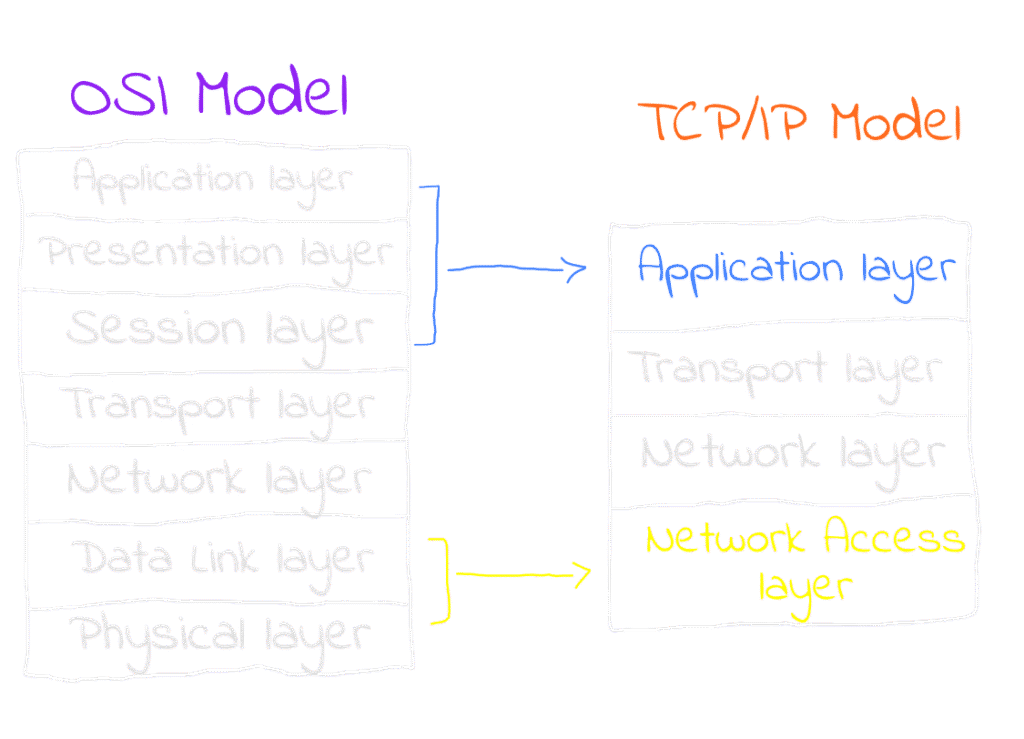
OSI stands for Open Systems Interconnection. The name itself reveals that this model was created to enable communication between various systems, such as different devices. Therefore, we can view the OSI model as a framework that ought to be adopted by any modern system seeking to communicate with other systems that also adhere to the OSI model. To be clear, the OSI itself is not the implemented framework in real life, instead, models like TCP/IP tend to be implemented as they are more convenient and abstracted, but they still contain all the OSI layers in some abstracted way. For example, the first 3 layers in the OSI model are abstracted into the Application Layer in TCP/IP making it clearer and easier to understand. So why are we learning about the OSI now? Because it is very great for understanding how network communication works, thus designing network protocols and systems and troubleshooting network issues by isolating problems to specific layers. Not sure about what I’m talking about? Keep reading and you will link everything by yourself. So the OSI is a very great reference and it is used by network engineers as a reference and terminology all the time when they talk. You’ll also get to understand TCP/IP although I will not explain it to you but you will understand it as we’ll focus on the big picture of why networking models are implemented in the first place through learning the OSI.
OSI Layers
Each layer in the OSI is a very important, foundational, and simple component in networking process. The OSI layers are highly interconnected, so if we think about needing to transfer data, we have to pass that data through the OSI layers which are 7 layers starting with the very first layer to the lowest layer which will actually transfer your data. What will happen in this journey that some all of the layers will work upon the data in a certain way to make it possible to transfer and then handle it’s transfer also, also this is where the idea of protocols comes in. Simply put, a protocol is a set of rules that governs a process. Protocols are crucial here because we don’t one layer handling the data in a way that would break the workflow of the other layers and you will see a great example that demonstrates this idea in this blog, Let’s go in an up down approach and understand the layers
Layer 7: Application Layer
In this layer, “application” doesn’t refer to the user software you’re using like WhatsApp or Netflix. The specific app doesn’t matter because all of them eventually use some form of a communication protocol which is the meant “application” here. The Application Layer provides an application that interacts with both the users and also their applications. For example, when the Netflix app tries to communicate to its servers to fetch new episodes to show to you or when you scroll through Instagram, they all rely on protocols like HTTP in the communication process here. HTTP is the “application” meant in this layer.
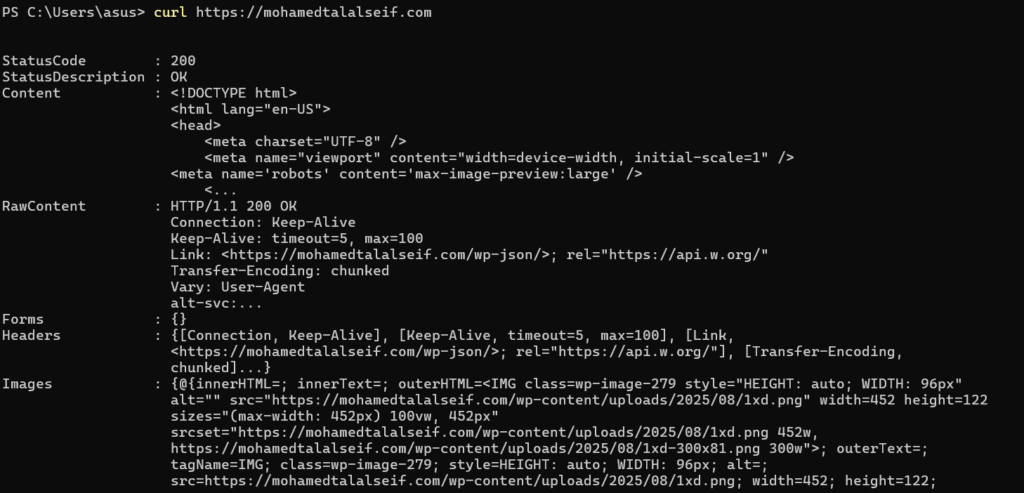
At this layer, specific protocols handle the data for the communication. For instance, HTTP (Hypertext Transfer Protocol) powers the World Wide Web by defining how nodes such as a web client and a server exchange information. HTTP messages include key-value pairs containing both the data and metadata like the server’s response status, “200 OK” or “404 Not Found”, along with other essential data needed for a successful communication, these data is added to your original data as part of what gets transferred. So if you’re sending any raw data using the HTTP protocol, the protocol will also add various additional data alongside to be transferred to make the communication possible.
Layer 6: Presentation Layer
Again don’t let the name trick you, it is not meant by “presentation” here the layer where the data will be presented to you like in a GUI. Actually, “presentation” here means the process of formatting the data to present it to other network components in a new form. Let’s take two very short examples to understand the process of presentation more. Suppose you are sending some data so your system decides to use the HTTP protocol in the application layer. Your data passes through this layer and now you have an HTTP message that needs to be transferred. But a big problem here is that HTTP messages are not encrypted and transferring raw data through the internet is extremely risky. Here presentation layer comes to serve and apply the TLS protocol, which encrypts your data. What happened here is that your data (the HTTP message coming from the presentation layer in this case), is now presented after being wrapped with TLS in the HTTPS form a new representation. Another example: suppose the file is very large and needs to be compressed. The Presentation Layer will compress your data into a new form, a new representation, and present it to the other network component. Now you can see how every layer is connected with the other layers and has an important function and greatly simplifies networking.
So in this layer protocols like TLS are applied, and any other protocols that change the representation of your data is applied!
Layer 5: Session Layer
This layer can be regarded as the first layer where the system initiates the actual process of data transfer. The layers above it focus on data manipulation for the transfering rather than transfer itself, making this layer can be considered as the true starting point for the transferring process. In a system that adheres to the OSI model, this process is typically handled within the operating system. At this stage, the OS sets up the actual ports on the machine for sending or receiving data. Data is not sent or received directly by a software, instead, So this process needs to be managed by the OS that takes care of various considerations.
Layer 4: Transport Layer
If everything is already set up for your data to be transferred, the route is determined over the network, and both hosts are configured for sending and receiving, this does not mean you can just push the data and be done. The actual transportation of the data is a complicated process on its own and the session needs to be controlled. Many scenarios can arise: for example, what if you keep sending data but the receiving host becomes overwhelmed to process all of incoming data? What if the data is too large to fit into the channel at once? What if the sender pushes data into the channel, assumes the receiver got it, but in reality, nothing was received? All of these factors must be considered. That is exactly why we need the transport layer, to handle these situations and ensure the communication goes as intended, and luckily we have transportation protocols to guarantee this.
Generally the most famous transportation protocols are the Transportation Control Protocol (TCP) pretty straight and User Diagram Protocol (UDP). Let me introduce them to you starting with the TCP protocol, TCP protocols builds a header over your data with some very useful attributes in the transportation process
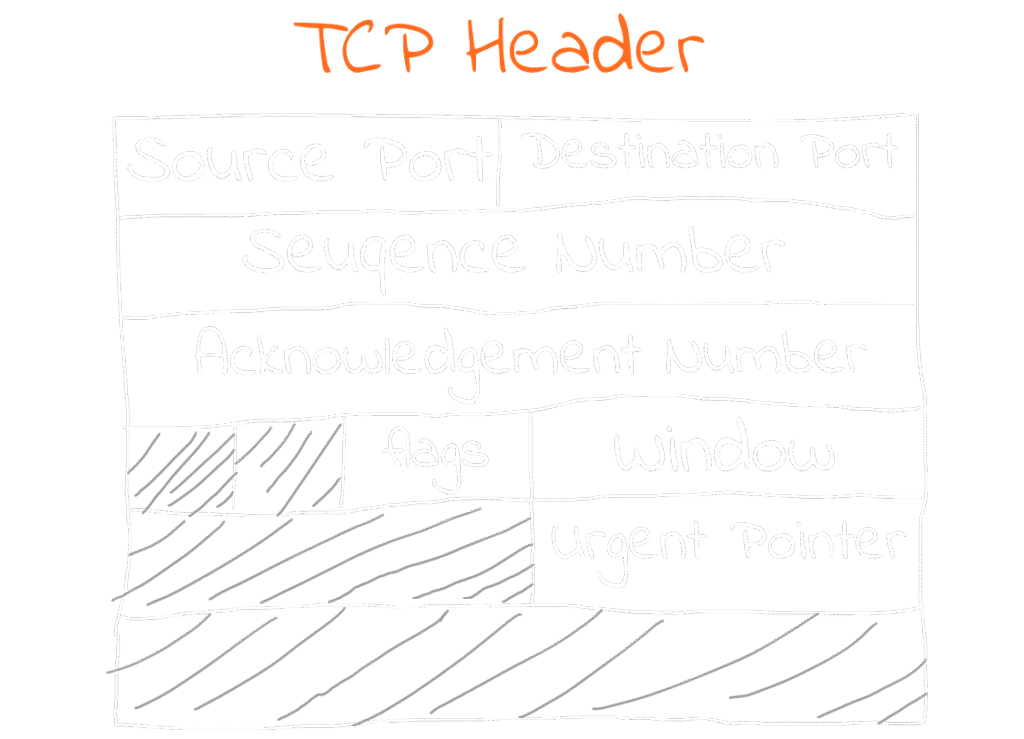
Since we are in the transportation layer, and the protocol’s name itself contains “control,” you should expect most of the attributes here to be data that control the transportation process. For example, as we mentioned before, suppose that the receiver and sender hosts are already known to each other. Now we need to know, which port on the machine the data should be sent or received within this is a part of the control process. That’s why we have source port and destination port fields in the header.
We also have the window size field, which specifies the amount of data the receiver can accept, preventing overwhelming traffic.
Another field is the urgent pointer. Suppose you are downloading a movie and suddenly you clicked the “stop download” button. This generates urgent data that needs to be sent and processed immediately, otherwise, the sender would continue transmitting the download data, which we want to stop receiving so here the TCP will control the transportation process by informing the OS in the session layer that the machine shouldn’t send the data anymore and the client machine shouldn’t recieve anymore so the OS can terminate the session.
A part Of transportation control is splitting the data also, if the data is very large it can’t be sent all over the network as one big chunk so the data will be splitted into smaller parts, the TCP protocol splits it into some segments, and the segments will be transported sequentially, for example segment ‘3’ of the data will be transported in the Sequence Number ‘3’ and when the receiver receive it, it will acknowledge the sender that it recieved it and move to the next segment needs to be sent in the seuqence. Have you seen the beauty? The compression which is in the presentation layer works with the transport layer both of them can include a goal to ensure smooth sending of the data, part of the presentation layer compress it and part of the transport layer ensure sending light-weighted and compressed data! They all work together like a symphony!
For the sake of completeness let’s get to know the UDP also, it differs from the TCP generally that the machines that uses the TCP in their session as we discussed to recieve or send data it requires to acknowledge each other the status of the segment so it process with the new segment or retry if itsn’t been trasnported this introduces some latency in transportation process. In the UDP we don’t do this, basically if the machines are using UDP in their session they don’t do the acknowledgment, this is very helpful in many scenarios where acknowledgment latency is serious. For example, in a voice call, if some errors occur while transporting a voice segment, it will be retransmitted this will make some delay. But while this happens, you’re talking aka still generating new data. If such retransmissions occur frequently, the accumulated delay will affect the smoothness of the call.
So you see there are protocols here to control the process of transportation based on what you are trying to achieve so understanding how these protocols work will help you to build your network service as you intended based on how would you adjust the protocol for your needs!
Layer 3: Network Layer
So far, we’ve discussed everything required to configure a communication process, starting from the application we use to establish communication in the application layer, down to controlling the process in the lower layers. However, we haven’t yet discussed the stage where the data actually finds it’s way and start moving. We all know that machines communicate using IP. IP is not just about the numbers that identify a machine; it is a complex protocol that allows us to communicate with in a complex network of machines which are physically attached to each other in some way.
I did not include some attributes in the header because, as we agreed, I am not explaining the protocol itself. I only included the attributes that will help us understand this layer. But of course, you can google the IP header to learn more about them — they are good to know.
In a network of machines which are attached together the IP allows any machine to communicate with any other machine in the network and this is by identyfing the Source IP and the Destination IP by this way the network knows what machines are communicating together now and finally we have the data know where it should go this was not existing in the previous layers. We have also the version field which is telling us the version of the IP IPv4 or IPv6. Time To Live field: If you are familiar with the internet infrastructure you will know that the internet is like a big cloud where you send your data after passing the OSI model so the data have the destination IP so there are routers in this big cloud, these routers sees the destination IP the machine is trying to deliver the data to it then it routes your data packet to the nearest router until it reachs it’s final destination, that’s why we have time to live attribute because some routers may miss with the packets and send them too far or maybe they loop your packet so in the time to live attribute there is a specific time for the packet to live in the network to resolve these situations.
The protocol field, a solid example for the main idea that I am trying to make you reach from this blog which is the protocols are set of rules to control a very sophisticated process and in the OSI model each layer deliver something to another layer to reach the big goal, protocol attribute is specifying which transport protocol the machines will use in the session (for example: TCP/UDP), and that’s because there is not one layer works solely and neglecting the others. Did you see now how what some layer do affect the other layers, this is the beauty I am trying to highlight!
Layer 2: Data Link Layer
In the network layer I was saying that the IP is allowing us to communicate between the machines in the network, this means that there is a network of machines that is already exists and this also means that there are machines that are wired together physicaly. So they wired them physically so there is actually a real physical path where the data can move and the communication process occurs. So since the data is actually moving physically then we need a protocol for this process because everything should be organized, this concludes that the IP is not what the machines are actually uses for the physical transfer “Shocked!” it is used only for logical communication throughover the network to identify the routes but the machines still needs to know the physical address to start sending the data to it and this is achieved by the Medium access control address MAC address, it is used to control the access through the real physical medium, it is a unique 48 bits long address that is unique for each NIC, in this layer the protocol which is used is the ethernet? protocol because it is physically linked network.