
Here’s everything you need to know about caching
What is caching?
Birds as well as CPUs do some caching. Caching in very basic words is the process where you storing data in a way that makes serving the future requests to it much faster, I like to define caching as transferring data from level to another faster one if this sounds vague for you don’t worry just keep reading the following lines will make it clear.
So why do we do caching?
In fact acccessing data is an expensive operation you can do, and it is filled with it’s own complexity, keeping in mind that accessing some levels is slower than accessing others
Suppose you want to read a file in the secondary memory repeatedly so instead of doing a very costly work to access it from the hard disk everytime you want to read it, the file will be moved into the main memory. The same goes for the CPU, if it needs to access some data repeatedly from the main memory it will became clever and decides to cache it in the nearby CPU caches instead of fetching it from the main memory. Moreover, the hard disk itself can have a cache layer. Before searching for the actual data on the disk, it first checks its built-in cache chip. If the data isn’t there, only then does it proceed to look for it on the disk, (You’ve just knew about the in-memory caching and disk-caching btw)
If you’re familiar with the computer architectures we explored in the previous blog, you’ll see caching as a savior. It spares you from issues like the propagation delay we saw earlier or the Von Neumann bottleneck, where it reduces bus traffic by keeping frequent data close. We also know these architectures don’t interact directly with secondary storage, so fetching from a hard disk (handled by the OS) is slower. Other factors, like differences in memory technology speed, also play a role, but we’ll cover those in a separate memory topic. For now, let’s just assume the only factor is distance: the closer we are, the faster we access.
Let’s take a fun example of caching to solidify your understanding: the DNS servers. These massive servers store the information needed to translate URLs like “mohamedtalalseif.com” into real IP addresses that your computer can actually use, since it can’t work with URLs directly. Every time you type a URL into your browser’s address bar, it’s sent to a DNS server, which responds with the IP address so you can access the intended website. Now imagine doing this for every site you visit, always waiting for a response from a completely different server, before accessing the website you want. Wild, right?
Now if we took the data the machine fetches from the DNS servers (further away level) and store it locally in our machine (closer level) i.e. doing caching, This allows us, whenever we try to access a website, to first check our machine for the IP. If it’s not found, a request is then sent to the DNS servers. This makes the process so much faster
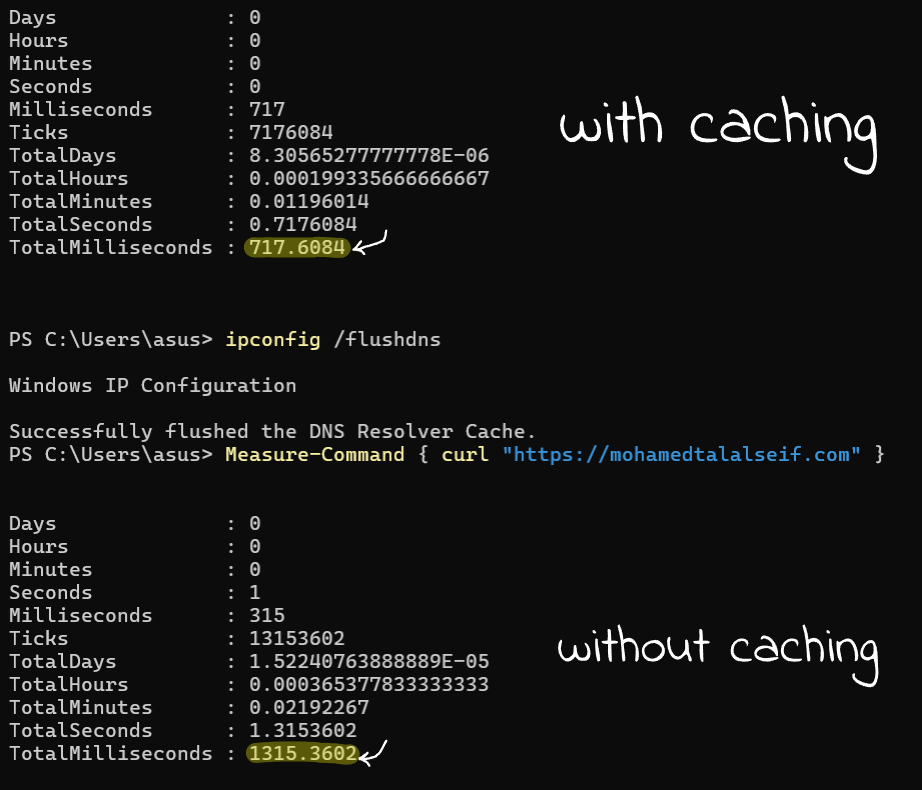
If you are wondering what is DNS Caching, this is exactly what is it, in fact you’ve understood the problem that requires caching to solve it, don’t limit yourself to categorizing each one (in-memory caching, disk caching, DNS caching, CDN caching… etc) when you’ve got the the main keys to think about the probkems that requires caching as a solution.
Now that we understand what the caching process is about, our next step now is exploring how caching works in technical manner
How caching works?
Caching terminology
Let’s narrow things down a bit and talk about caching in the CPU specifically, as the same mechanism applies to other computing layers.

So far, we know that CPUs try to access data from the closest levels first. Generally, let’s talk about two ways to describe this process. The first is a sequential approach, where the CPU checks the nearest level first. If the data is found, this is called a cache hit (when you hit the data in the cache unit), otherwise it’s called a cache miss. The second works similarly but checks levels concurrently.
Cache Performance
More cache hits lead to a higher hit ratio (cache hits ÷ total accesses); likewise, more cache misses lead to a higher miss rate (cache misses ÷ total no accesses, or simply 1 – hit ratio)
It’s good practice to know the average time it takes to access data when caching is involved, as this gives you a clear idea of your cache’s performance, so let’s denote the time to access the level 1 as T₁ , T₂ for level 2 and so forth, and the hit ratio as H₁ for level 1 and so forth and here is a good formula to calculate the average data access time:
Sequential accessing: H₁T₁ + ((1-H₁).H₂).T₂ + ((1-H₁).(1-H₂)).T₃ + … and the formula extends
Parallel accessing: H₁T₁ + ((1-H₁).H₂).(T₁+T₂) + ((1-H₁).(1-H₂)).(T₁+T₂+T₃) It is the same formula again but you’re gonna add the accessing times together as you accessing the levels in parallel.
If you’re wondering what data actually gets cached, this is a very complex process and it’s mostly handled by the embedded logic of the CPU with the help of other compenents like the operating systems which do (in-memory caching) through deciding which pages? should be kept into the memory or even the compilers which optimize your code to help the CPU to cache beneficial data, this is known as system-level caching
There’s also user-level caching, where developers explicitly add caching layers and decide what data to store. For example, Redis is often used to cache API responses or session data to boost performance. Here, We’ll focus only on the CPU’s embedded caching logic, but first, let’s look at cache organization
Caches Organizations
A cache unit consists of cache lines, the smallest fixed-sized storage units (typically 64 bytes) that store data from the main memory. The main memory is word-addressable, meaning the smallest unit CPU can access is the word. If the word equals a byte, then it is byte-addressable memory. Instructions (typically fixed-size) and data (variable-sized, e.g., char = 1 byte, int = 4 bytes) can take more than one word. When these (instructions and operands) are fetched by the CPU and need to be cached, they are stored in cache lines. Since their size does not necessarily match the cache line size, we assume a memory consists of blocks each equal in size to a cache line. These blocks can hold different data arrangements, e.g., a 4-word block could store two values (2 words each), four values (1 word each), or a single instruction taking 4 words…etc. When the CPU fetches data from memory, it fetches the entire block instead of the words containing it only.
For simplicity let’s assume the cache line size and the memory block size are equall to 1 byte, and let’s observe what are the different organizations that can store these data..
Cache Schemes
Different cache schemes mainly rely on the idea of dividing the cache lines into sets called sets, and the data is stored anywhere within the set that is mapped to, this is known as cache associativity
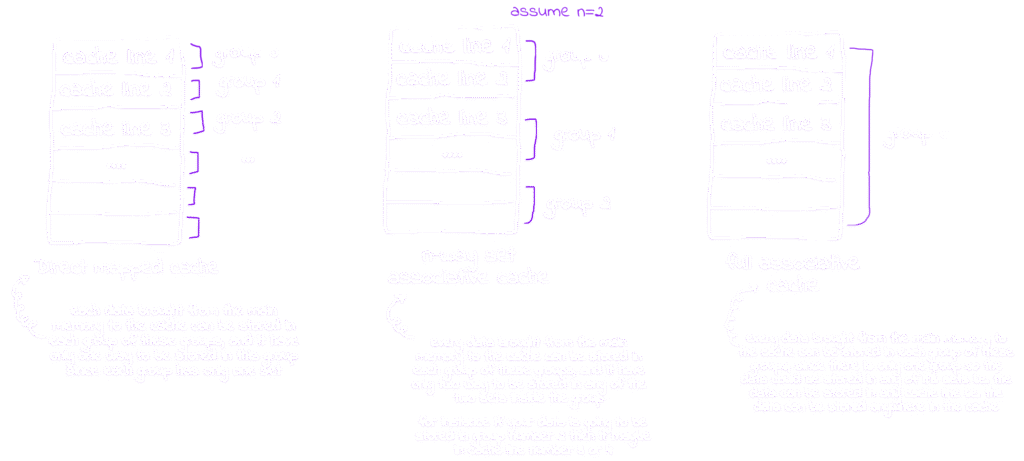
From the figure above we can conclude that the data in the memory are mapped to the cache lines in 3 main mapping techniques
Direct Mapping
Each memory block is mapped to only one specific line inside the direct-memory cache organization
Set Associative Mapping
Each memory block is mapped to one set and can be in any of n-sets inside this set inside the n-way set associative cache organization
Full Associative Mapping
Each memory block can be mapped to any line inside the full associative cache organization
So, How can the CPU decides which cache line the memory-block should be cached into?
Well that’s a smart question, and the answer involves scratching the underlying data structure behind caching. Simply put, hashing means assigning a key to your data by passing the data through a hash function it generates a key based on this data. If the CPU has an embedded hash function that takes a memory block as input and outputs a key, then using that key as the cache line it should be mapped to this solves the problem.
Let’s figure it out what does this mean? and try to determine by ourselves a cache line for a memory block inside the memory. Since the mapping technique varies with cache organization, let’s start with the most straightforward: direct mapping.
For simplicity, we’ll assume the cache consists of 4 lines and the memory consisits of 16 blocks
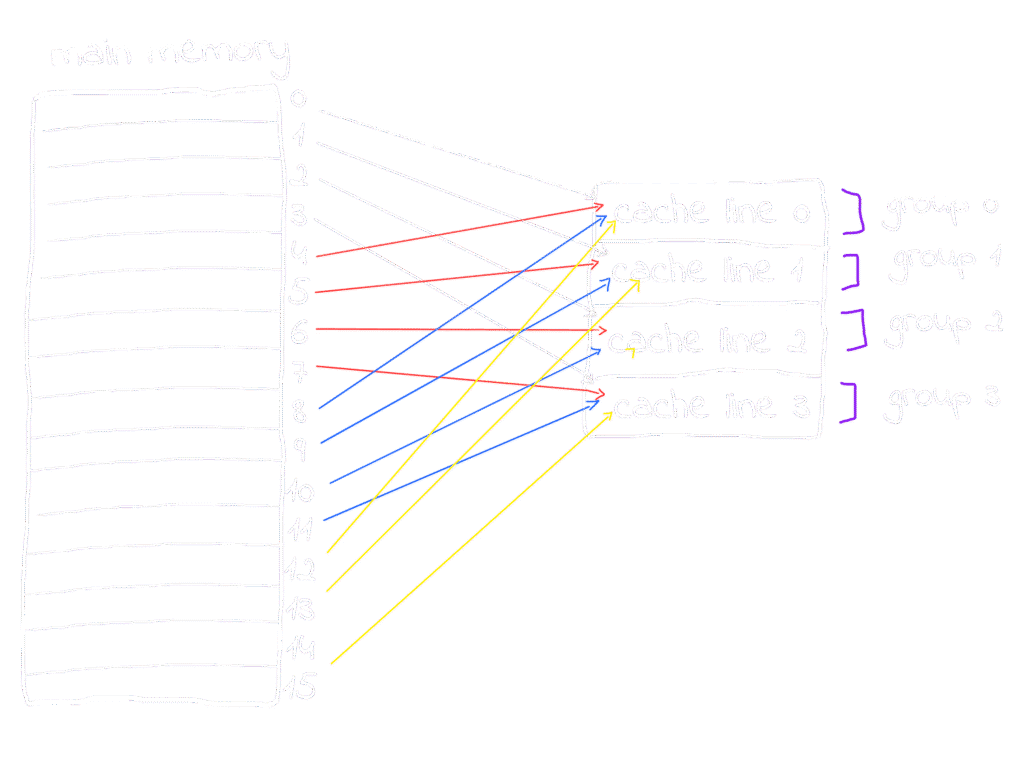
In direct mapping, block 0 goes to line 0, block 1 to line 1, block 2 to line 2, and block 3 to line 3, each block maps to its corresponding line,
You might wonder: memory blocks 0, 1, 2, and 3 are cached into lines 0, 1, 2, and 3, as they are their corresponding lines, simple enough, but what about block 4, 5, 6, 7, .. where are their corresponding lines, well Round-Robin comes here to serve: a simple pattern occur, blocks are mapped to lines one by one in order blocks 0, 1, 2 and 3 mapped to lines 0, 1, 2 and 3 respectively, followed by blocks 4, 5, 6 and 7 mapped again to lines 0, 1, 2 and 3 respectively and the pattern keeps repeating, so blocks 0, 4, 8, 12 should be mapped to the same line in the cache which is 0 similar 1, 5, 9, and 13 will be mapped to line number 1 in cache and so on.
Don’t bother yourself with questions like what happens if two blocks map to the same cache line at the same time we’ll cover that in detail shortly. For now, let’s focus on the key question which is: why does Round-Robin work here? What causes some blocks to be mapped to the same cache lines as others? Where does this pattern come from?
The answer lies within the memory blocks themselves, so let’s zoom in and see what’s going on. In our example, there are 16 memory blocks and 4 cache lines. Since each block or line consists of words, let’s assume also that the block size which is equal to line size = 4 words, that, the memory size is 16 block × 4 words = 64 words, and the cache size is 4 lines × 4 words = 16 words
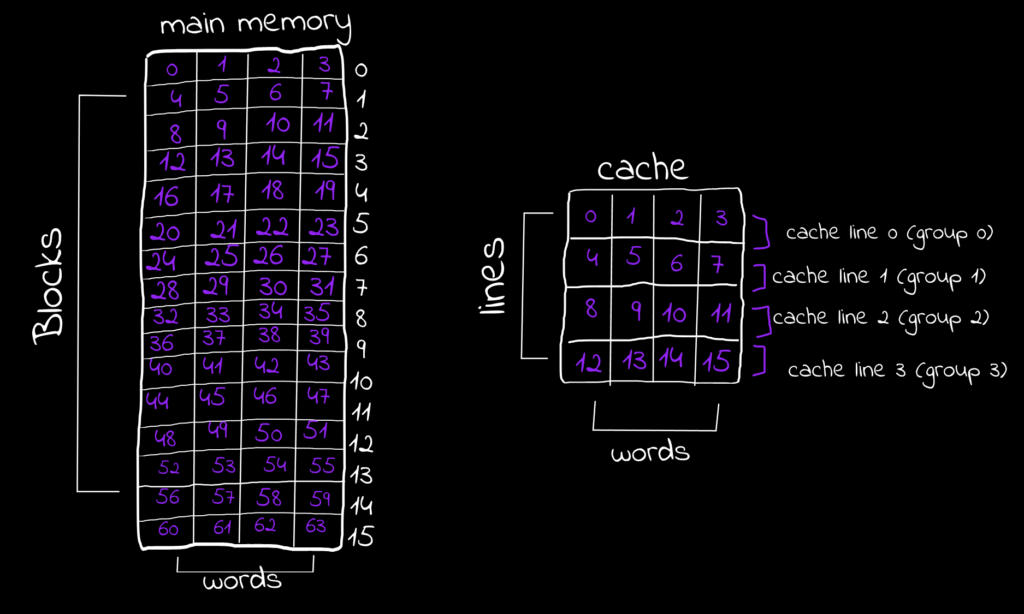
Suppose the CPU is going to fetch some data (instruction or operand) from the main memory, assuming any data inside the main memory takes only one word to be represented. Now suppose the CPUs going to fetch the data stored in that word from the memory and is going to cache it, we learned from a brief moment that the CPU is not caching the word only it cache the entire block so the CPU will cache the entire block contains this word, and let’s see why?
Since we have 64 words, they are also the memory size, to figure out the number of bits needed to access any word in the memory, the formula Log₂(number of words “Memory Size”) is applied, so in this case Log₂(64)=6, a physical address of 6 bits can represent any address of 64 word.
You can store anything you want at any word and any word has it’s addres, In our discussion about Round-Robin we saw that the block numbers 0, 4, 8, and 12 will be cached into line 0, so let’s take a word from each block of these, no matter which word as long as it lays in the block, and extract their addresses, for example I will take word at address 1 from block 0, word at address 19 from block 4, word at address 33 from set 8 and finally word at address 50 from block 12, You can pick any other words from these sets instead of my choices and try the example with me, and you will see the same results.
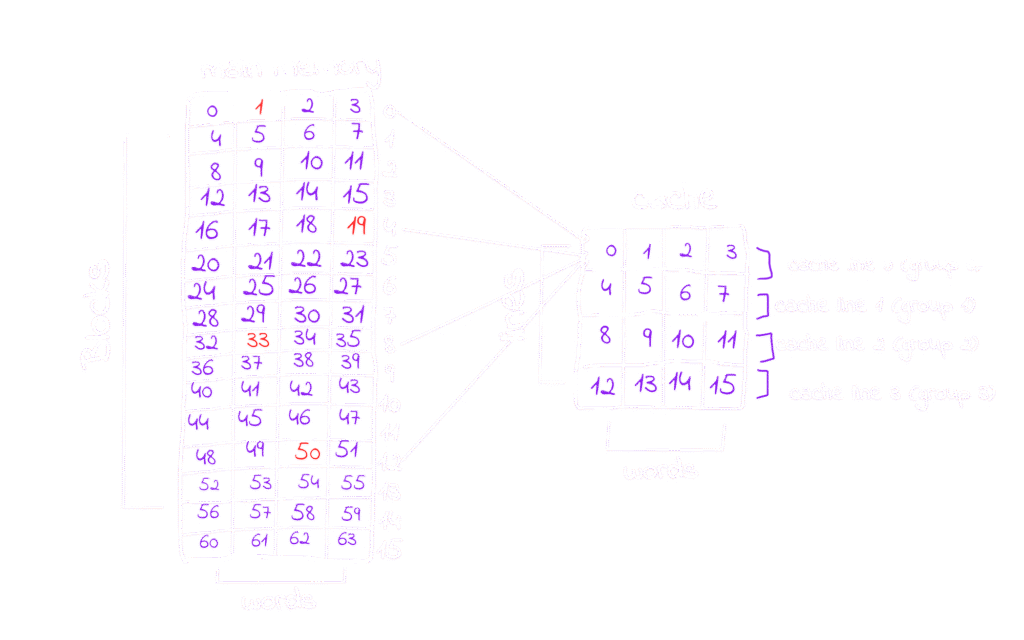
Whether you use the words I picked or your own, you’ll notice that the physical addresses all share some fixed bits that are staying the same across all four blocks, I’ve highlighted these bits in red.
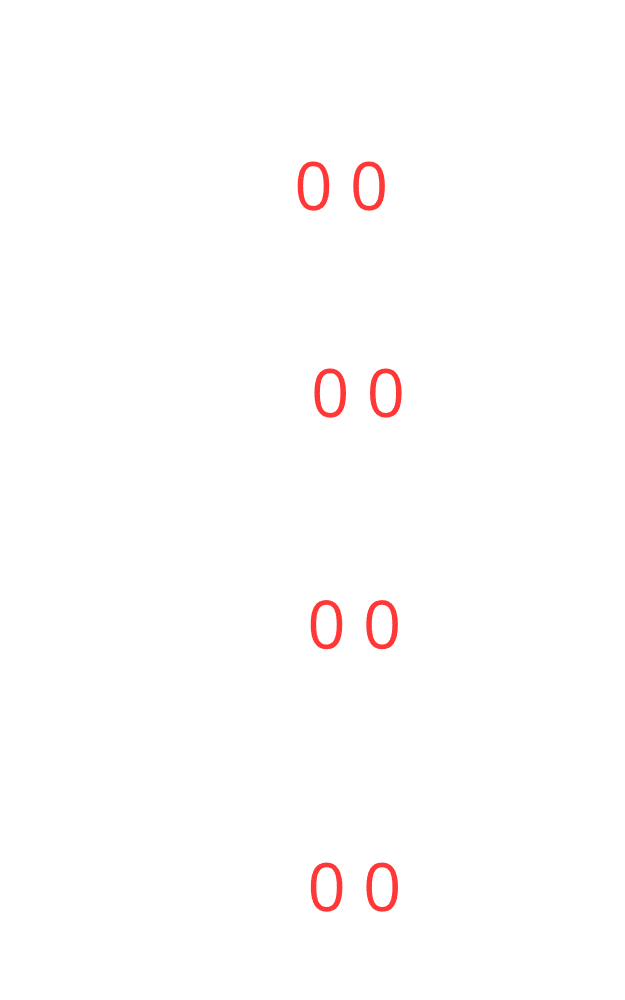
These bits in the addresses toggle following a gray code? pattern. That’s why any word at blocks 0, 4, 8, and 12 have 00 as their fixed bits, while blocks 1, 5, 9, and 13 have 01, and so on. The fixed bits follow a repeating sequence of 00, 01, 10, and 11. The number of cache lines matches the number of elements in this sequence, so each block maps to its corresponding cache line based on these fixed bits
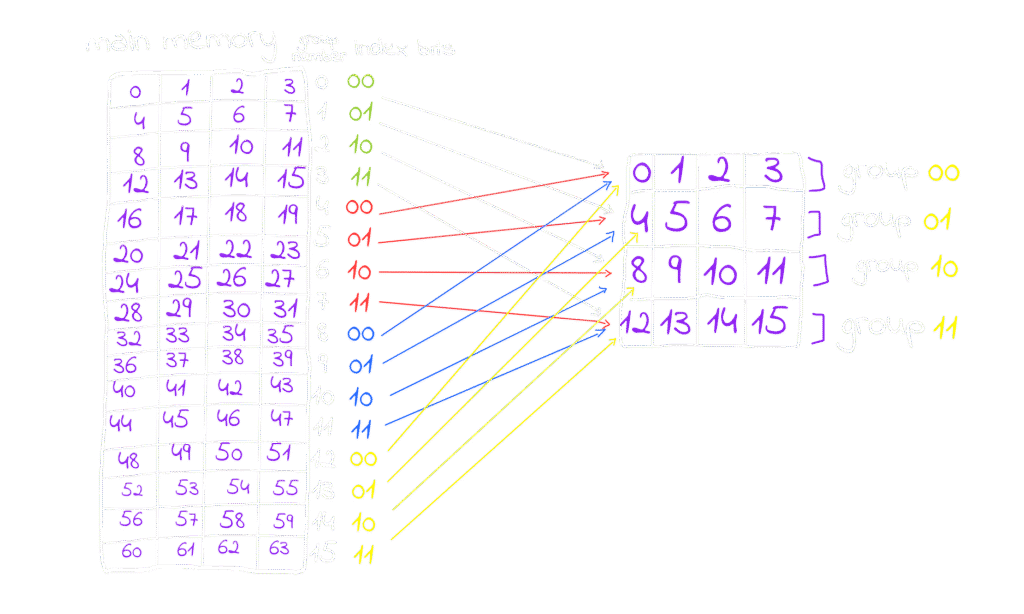
in this figure each block have the fixed bits of the words inside it, and the pattern is repeating, these fixed bits are called index bits because they indicates the index of the set the block is going to be cached, this is also a modulus operation if you are a math guy it’s (block number % number of sets in the cache) , we have also something called offset bits they are right to the index bits and they indicate in which column the word is stored, for example for any word at the column number 3 e.g. 3, 7, 11, ..etc they all have 11 as offset bits for column number 2 the offset will be 10 and so on. Actually, try it by yourself, stop reading, and pick any word, try to figure out the index bits and the offset bits by your own to solidify your understanding, in this example the physical address is like this (2-bits)(2 index bits)(2 offset bits).
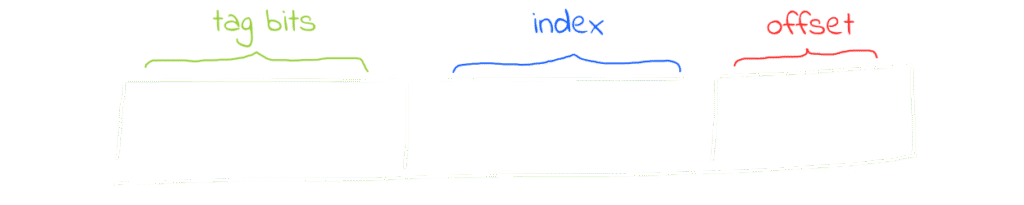
A physical address will be always structured like this. I don’t want you to be confused about the index and offset bits size as they aren’t equal in size in all architectures, you can determine the size of the offset and index bits through the follwing formulas:
- Number (size) offset-bits: Log₂(Number of words inside the block “Size of block” )
- Number (size) index-bits: Log₂(Number of sets inside the cache)
- Number (size) tag-bits: Physical Address Size – (Offset Size + Index Size)
Try this example if you want: an architecture has a byte-addresable memory consists of 128 words, have a block size of 4 words and it’s cache size equals to 32 words, what are the size of offset, index and tag bits. You can find the answers at the end of the blog!
Now let’s talk about this ambiguous tag bits, what are these bits and what do we use them for?
Let’s assume that the CPU fetched a block from the main memory, now suppose the CPU wants to access a word inside this block, it first will check if it’s inside the cache so the cache is functioning here and we are getting it’s benefit, how could the CPU checks if it is inside the cache? it shouldn’t search for it, this will break the main idea of direct mapping where each block is mapped to a line that we know and go directly for it. Well here the tag bits come to serve.
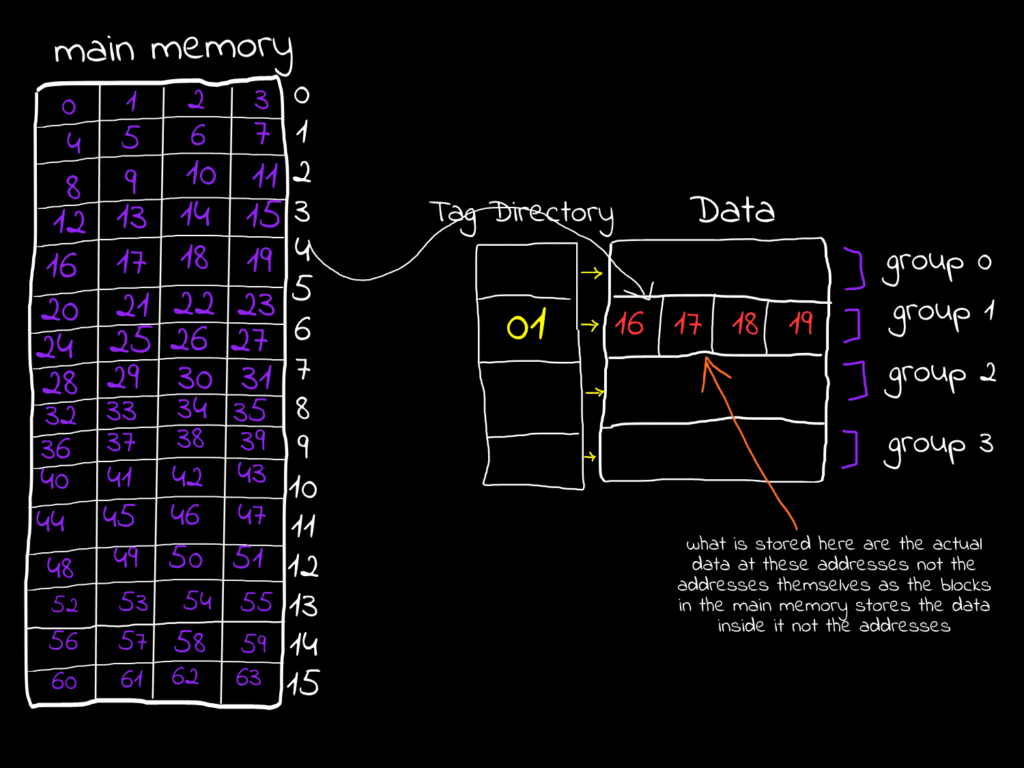
Suppose the CPU is going to cache the word at address 17, so the entire block will be brought to the cache, since the block index is 01 so it will be brought to set 1, now when the CPU brings this block into the cache it brings aslo the tag bits of the block and put it in a so-called tag-directory, simply every word at address 16, 17, 18 and 19 have the same tag bits that is assigned to them, let’s try it and convert them all to their binary representation, also feel free to pick up your own example
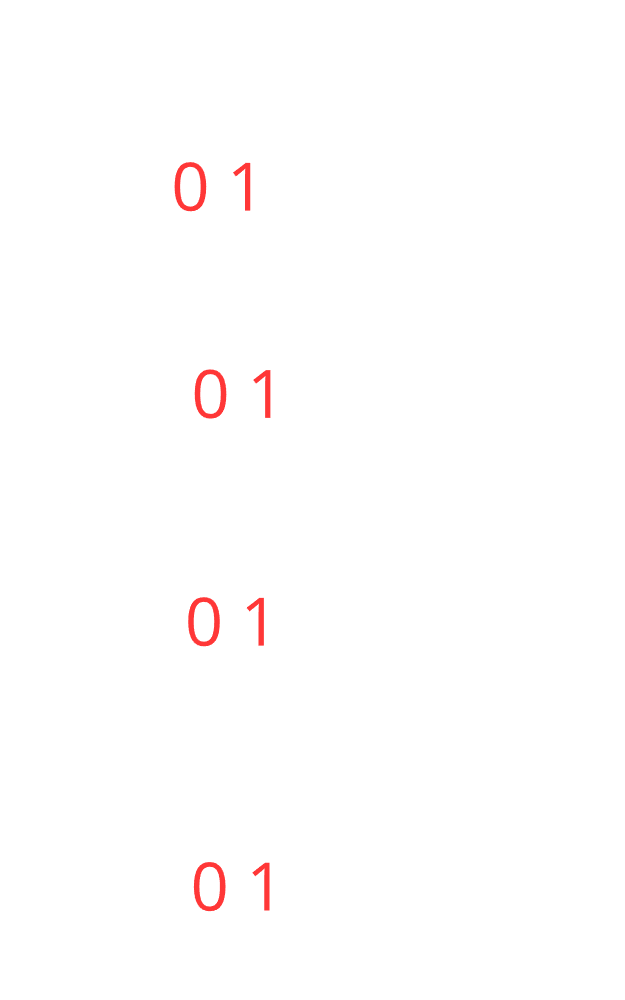
In our example the CPU is trying to fetch the word at address 010001 (17), so what will happen here is the CPU will take the index bits in the address and go to it’s corresponding set, so set 1 row is now selected, it will also take the offset bits and select the column based on it, so column 1 will be selected, now the full word is selected, now the step of the tag-bits it will check if the current tag associated to the set in the directory is identical to the tag in the address, if true (cache hit) then it will fetch this data from the cache thus it doesn’t have to go all the way back to the memory, if false(cache miss) then it will fetch it from the memory, so the CPU doesn’t need to save the whole addresses of the words in the cache instead a small portion of it which is the tag, and this is very efficent and elegant logic in terms of the hardware real implementation.
If the CPU decides based only on tag-bit matching, does that uniquely identify every block so we can be 100% sure the cache line is the exact block we need from main memory? The short answer is no… but also yes.
Example: in our case we have 16 different blocks in memory, but the tag size is only 2 bits, giving 4 possible values (00, 01, 10, 11). A 2-bit tag alone can’t distinguish all 16 blocks. However, when combined with the index bits, they can. Here, 2 tag bits + 2 index bits uniquely identify any block in memory, we don’t store the index bits in any part of the cache, actually we don’t need to! because when the CPU first uses the index in the address to select the cache set, any tag after this will uniquely identifies only one block in memory so if we are in set 0 in cache and the tag is 11 this means we are working with the block their all words start with 1100 (tag-bits)+(index) combined.
Please if this feels a little bit confusing, take a while and pick up any block from the memory but it in it’s right place in the cache based on the index, and try to fetch any word in it using the same logic provided in this part, everything will become clear and you will literally understand the whole process here, so don’t keep reading unless you understand this part, trying your own examples won’t be hard at all
God! I love binary system, how can 0s and 1s do all of these logic
The same goes for the n-way associative cache, for example in the 2-way set associative cache (it doesn’t mean also you have only 2 sets at the cache it means you have 2 lines per set in the cache whatever the cache size), if there is a block should me mapped to line 0 for example it can be mapped in any of it’s lines, this gives us very good flexibility.
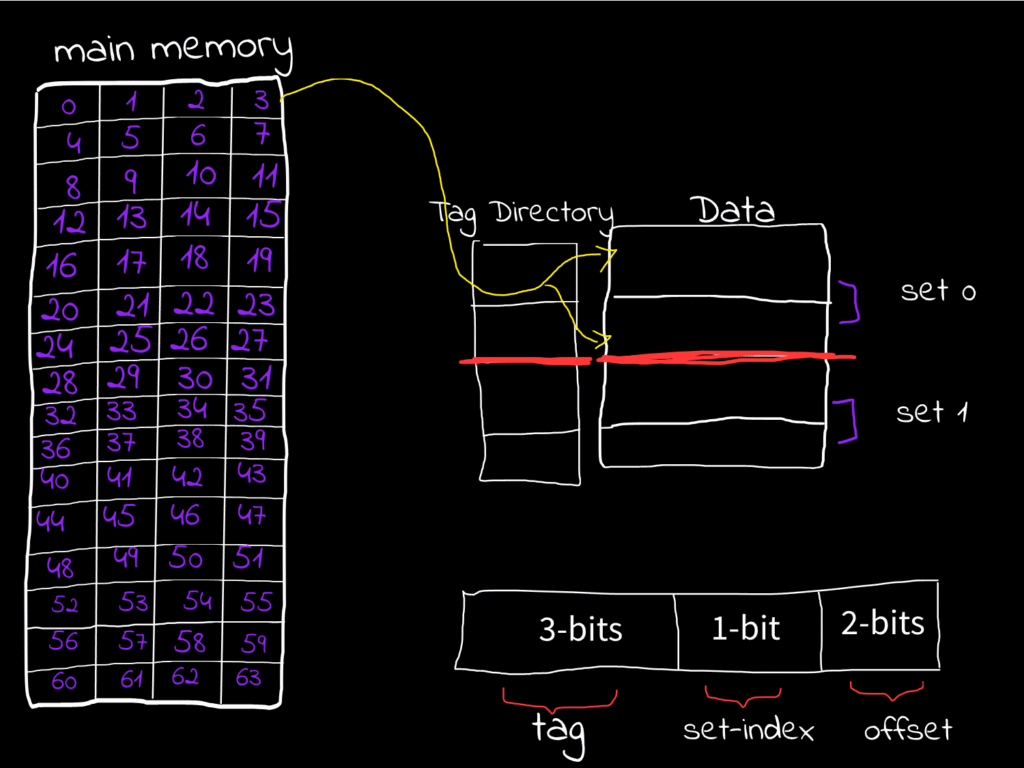
For a full-associative cache since the full cache lines are the only set exist we don’t need index bits to select the only set exist in this set, instead we are using the rest of the address after the offset as tag bits.
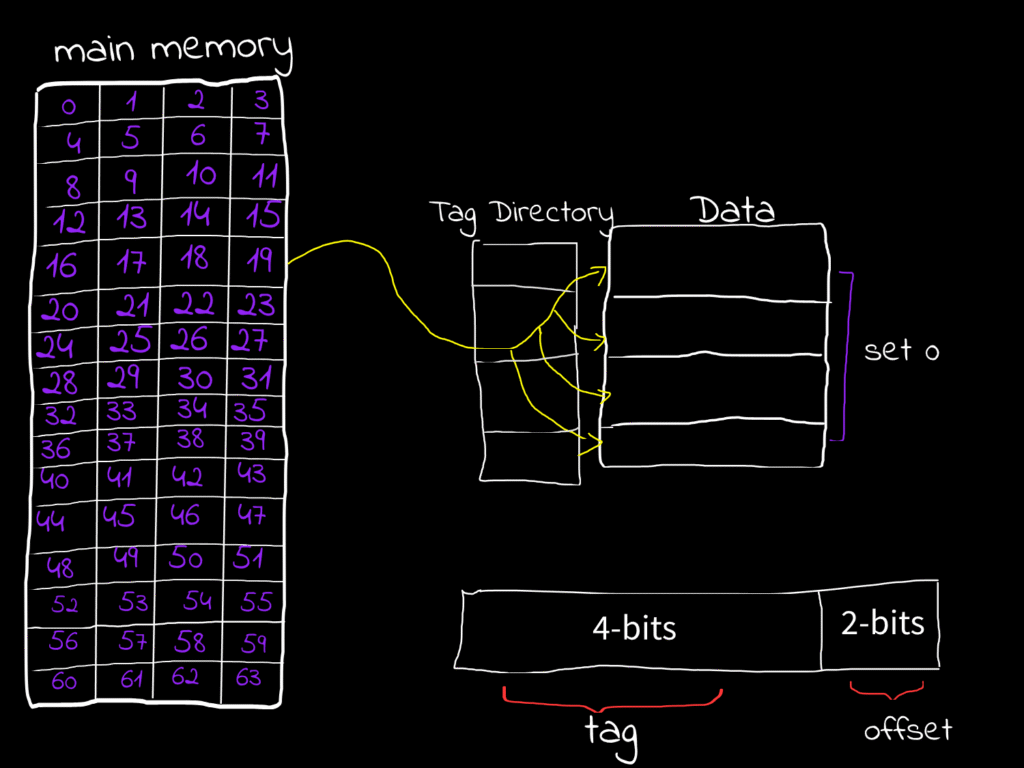
Associative caches comes with very great advantages. If you have two memory blocks hat should me mapped to the same set, you can’t cache both of them in the same set in direct mapped caches, however, in the associative caches you can, if we are taking about 2-ways set associative caches you can map two different blocks has the same index to the same set in the cache, you will put each block in a different line in the set, and this gives so many advantages.
Since the whole block not only the words is being cached, this gives us a great advantage in so many cases, consider this example.
for i in range 50:
  for j in range 25:
     print(li[i][j])
#Cache friendly code
Assume our cache line in this case is consisting of 25 words, and each item in the list (li[i][j]) stored in only one word, since the list is stored in consecutive places, li[0][0] to li[0][24] will be stored in the same block, if the CPU is going to cache li[0][0] it will cache the entire block till li[0][24], this is amazing because in this loop the CPU don’t have to go back to the memory and fetch items till li[0][1..24], they are already fetched in the block in the cache when the CPU first fetched li[0][0].
This is called Spatial Locality, typically we have two cache localities:
- Spatial Locality: It means all of those data are stored nearby to the recently used data have a very high chance of being used also, so we keep them in the cache.
- Temporal Locality: It means that the data that is recently used has a high chance of being used again, so it is kept in the cache.
Consider this example again:
for i in range 25:
  for j in range 50:
     print(li[j][i])
#Cache unfriendly code
in this code snippet, the CPU is going to fetch li[0][i] then li[1][i], then li[2][i]… every one of them is stored in a different block, the CPU is fetching a new block every sub-iteration and is not using the rest of the block it fetched, this is wasted, it is not only because the CPU is fetching different blocks it will not use anything of them except only one word inside, it is also because the different blocks inside the cache that we need them being replaced by CPU with these blocks you will not use, it replace them because there is a conflict, there should be 2 blocks cached to the same place.
In the world of caches, there are 3 primary cache misses:
- Compulsory Miss: It occurs when a word in the memory block is accessed for the first time, meaning it’s not yet in the cache, so the CPU will fetch it from the memory, they also tends to call it cold-misses in some contexts.
- Conflict Miss: It occurs when a block needs to be cached in a set but all of the lines in that set are occupied by other data, so you need a good-replacement policy to decide what you are going to do here (However conflict misses in the associative caches are less than in the direct mapped caches, this is the flexibilty I was taking about)
- Capacity Miss: It occurs when their are no empty lines to cache some block, you can see this miss clearly in the full-associative cache, where all lines are occupied.
When the CPU hit or miss the data if it was going to make some work other than reading, suppose it was going to write or update this data, if the data is in the CPU cache and it modified it, Will it be modified in the memory also or in the cache only? it depends on the Write Strategy that the CPU uses.
Write Stratigies:
Cache Hit Strategies
- Write Through: When the CPU writes in the cache and the main memory at the same time
- Write Back / Write Deferred: When the CPU write the data in the cache, then it modify it later in the memory whenever the block leaves the cache, it do this by assigning something called dirty bit it is a bit indicate if this data inside the block needs to be modified in the memory after exiting the cache(didn’t talk about replaces or these exiting yet)
Write Through maybe slower but maintaining data here is better, as if the data is lost and it is written by the write back strategy, restoring it will be impossible
Cache Miss Strategies
- Write Allocate: It brings the data from the memory to the cache then write it through any of the write strategies strategy
- No-Write Allocate: It update the data directly in the memory
Replacement Policies
Whenever a miss occurs their should be a good policy that decide which line to remove and be replaced with the new item needs to be added, imagine if you want to cache a block in a set but all of it’s lines are occupied!
Optimal Replacement (Bélády’s Optimal) Policy
Evict the block that will not be used for the longest period of time in the coming duration, but since it is impossible to predict the time accurately this is a theoritical policy and is not implemented, although, it may be used for benchamrking, through comparing the replacement policy that you are using with this optimal one to know the performance, if there are 2 blocks that won’t be used for the same longest amount of time, FIFO works here as tie-breaker, you will see in the FIFO policy, since it is theoritcal we needed to invent these policies.
Random Replacement Policy
It evict blocks randomly and replace them with the new one, this used to be implemented in some of ARM architectures but now it is not implemented anymore due to it’s inefficiency.
First In First Out (FIFO) Policy
As the name suggests here the first block arrived to the set will be evicted, then if some miss occured again the next line will be evicted and so on, in the set associative caches blocks are cached to the first line in the set then the next.. etc that’s why in FIFO evicting starts from the first line, it is used also as tie-breaker for other policies, you will see this now.
Last In First Out (LIFO) Policy
As the name suggests, the last block arrived to the set will be evicted and it will be replaced with the new one, then if some miss occured again the previous line will be evicted and so on.
Most Recent Used (MRU) Policy
As the name suggests, the block that was accessed most recently will be the one evicted first when a new block needs to be loaded into the set. This is essentially the opposite of the Least Recently Used (LRU) policy, and it assumes that the most recently accessed block is less likely to be used again soon compared to older ones.
Least Recent Used (LRU) Policy
Again as the name suggests, the block that has not been accessed for the longest period of time will be the one evicted first. This policy works under the assumption that blocks used recently are more likely to be accessed again soon, while older, unused blocks are less likely to be needed.
in FIFO and LIFO we can determine the “first block placed” or the “last block placed” on their line index inside the set, Example: if there is a 2-way set associative cache that means 2 blocks can be cached into the same set, the first block arrives to the set will be cached into the first line in the set, the next block will be cached to the next line in the set, caching sequentially, therefore the CPU have no issues in detremining First Ins and Last Ins. The real is in the LRU. How the CPU is going to keep track of the recent used cells? the answe is, We use a so-called age bits, they are bits that keep tracking of recent used lines in the cache, it is first intialized like this.
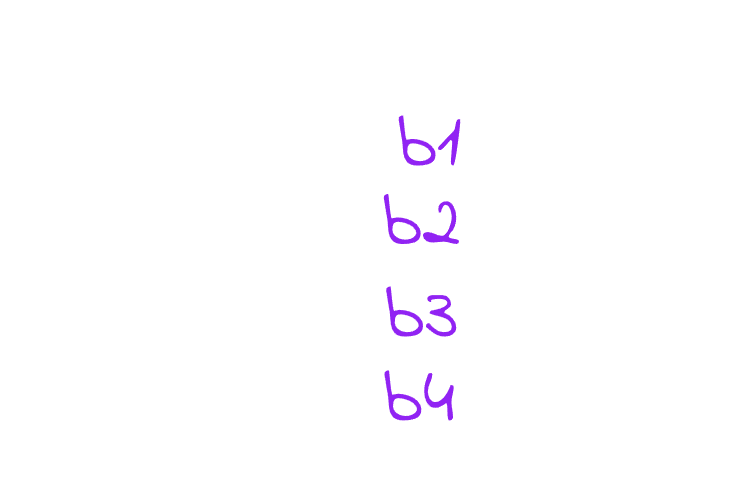
The figure shows that line 0 is the least recently used, then line 1, then line 2, and finally line 3. If the CPU wants to put new data in the set using LRU, it will replace the line with the smallest age (line has age-bits 00), with the new block needed to be cached, then it will assign it’s tag bit the highest value which is 3, since it’s now the most recently used, and all the other lines’ ages will be decreased by 1, in this case the LRU line is line 00 so let’s replace it with the new block we are going to cache say block 5 is the new block needs to be cached
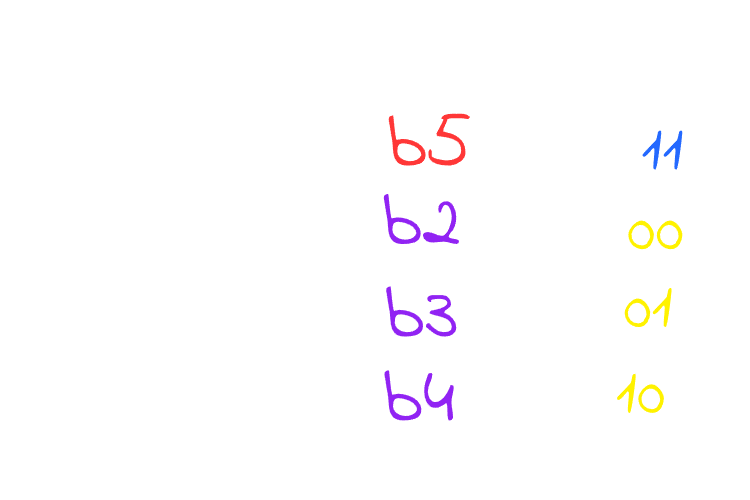
As you see, block 5 replaced the line 0 which is the least recent used, now this line is the most recent used so the line’s age will get updated to 3 since it is the most recent used then decreasing every other line’s age by 1, now what if you want to cache Block X through the LRU policy, very easy! select the line which has 0 as it’s age replace it update it’s age by the highest value can your age bits holds which is 3 in this case, decrease all other by 1, and the process keeps repeating.
In MRU we don’t need them we need to save the most recent only suppose the CPU is going to access blocks: 5, 3, 4 and 2 sequentially since these blocks are all inside the cache then they are all hits, if the CPU tries to access block 6 which is not inside the cache resulting a miss then it will need to replace it since we are using MRU it will replace the Most Accessed Block which is the block number 2 as it is the most recent block fetched in the sequence above so it will replace it, and the most recent used now is the block 6 and so on.
Don’t confuse this with direct mapping. You might wonder how these blocks can go into any line of the cache, but remember – we’re talking about a set. In the example above, blocks b1, b2, b3, b4, and b5 all belong to the same set, so any of them can be stored in any line within that set so they can replace each other. If a block doesn’t belong to this set, it won’t replace anything in it, it will be replace other lines in its own set instead.
Age bits are very elegant and smart but the issue is the size of these bits are ⌈Log₂(n)⌉*n (where n is the number of lines in the set), this makes an overhead in the higher associative caches, imagine if there are like 512 lines you will need 9 bits for each line which is 9*512 = 4608 bits! this is massive and it keeps growing exponentially, to solve this we have Pseudo-LRU
Pseudo-Least Recently Used (PLRU) Policy
This policy is still based on the Least Recently Used (LRU) concept, but instead of maintaining exact LRU ordering, we approximate it using a binary tree approach. This allows us to reduce the storage overhead for LRU tracking from ⌈log₂(n)⌉ × n bits down to just n-1 bits per set, a substantial reduction in hardware complexity and metadata storage requirements, resulting a huge performance efficiency, like instead of using 4608 bits in the previous example we will down them all to 511 only! What a miracle !
The nice thing here is that it doesn’t require complex logic to function as it involves toggling the bits only, to understand this, let’s try this example, the CPU is trying to fetch these lines from the cache sequentially b3, b2 and b9, let’s suppose that b9 is not in the cache so the CPU will use the PLRU policy to store it in the cache.
in this figure and based on our example b3, b2 and b9, the CPU will start fetching b3 so toggling the first bit in the tree to 1 (upward), then it will toggle the next bit to 0 (downward), and then the third bit to 0 (downward) and you reached b3
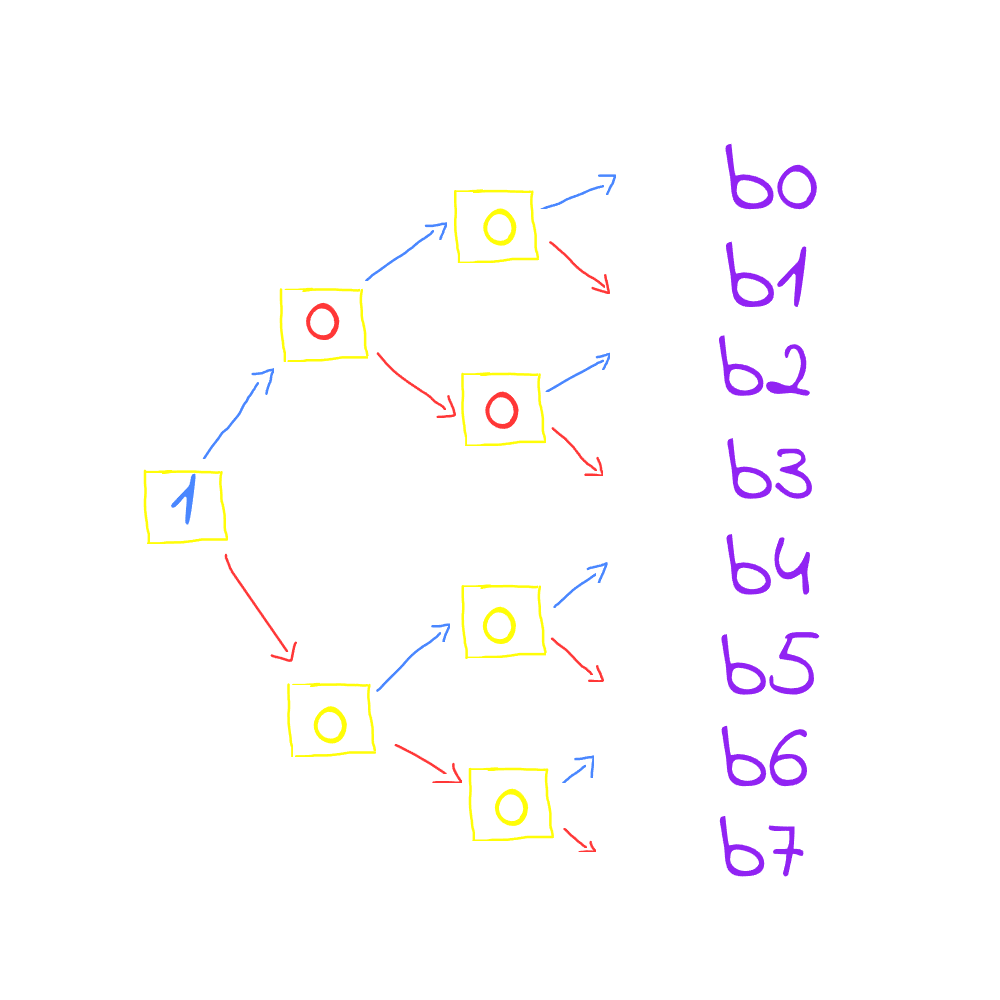
now what if you want to access line 2 for b2, then you will have to toggle the last bit to 1 instead of 0
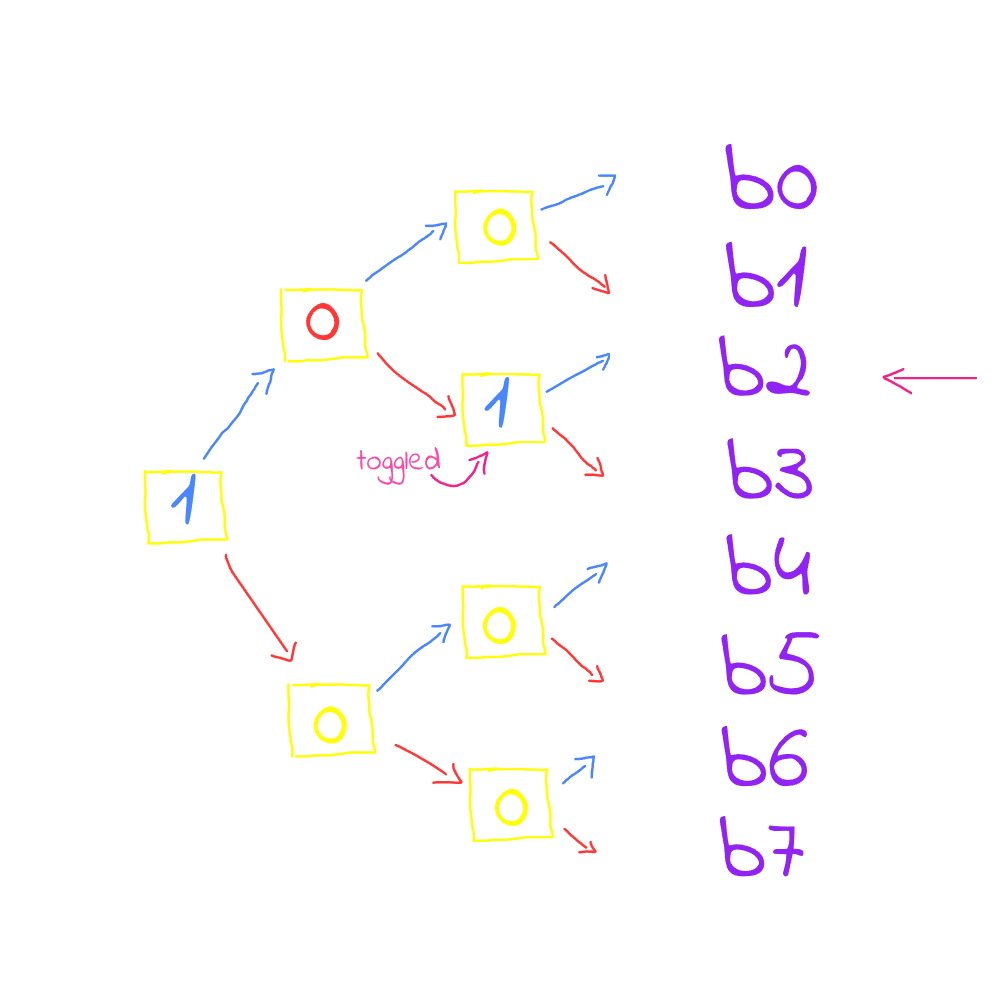
now block 9 is not in the cache at all. Note that each bit in the tree is pointing towards the most recent used line, i.e. the first bit which is the node holds the value 1 (upward) which means that it is pointing upward towards the most recent used half sub-tree, then the following bit is pointing downards and the next bit is pointing upward to line 2.
If a cache miss occurred, since the bits are toggling to the most recent used lines and we want to replace the Least Recent Used, the all thing we need to do is to toggle the binary tree bits (if the bits are pointing to MRU, then toggling them will point to the LRU)
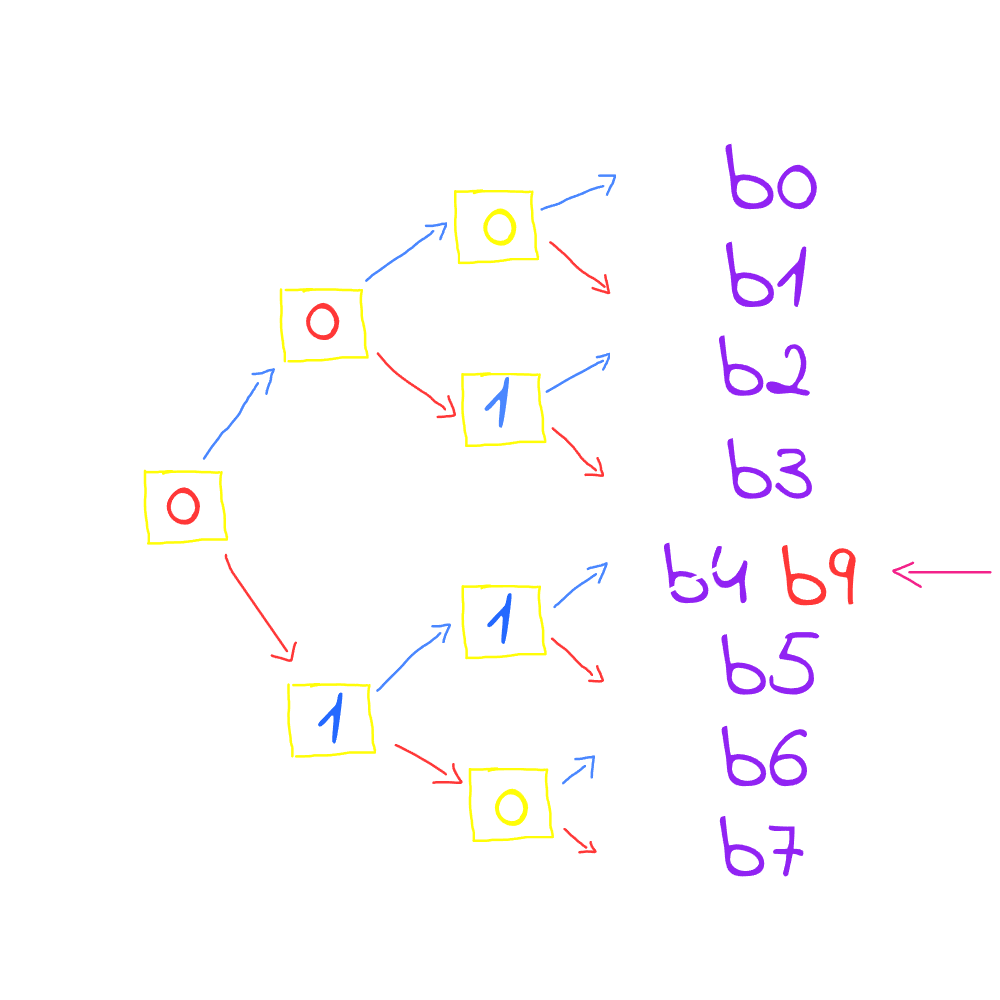
As you see b9 is not in the cache so the CPU have to replace the least recent used line with b9, so the tree is toggled starting from the root node. The root is toggled first, then the direction it points to is followed. If it is 0, it is toggled to 1 and then moves upward, if it is 1, it is toggled to 0 and then moves downward. This process continues until reaching a line that should be the least recently used. In this case, b4 is the line reached. Although b4 is not the exact least recently used bit, it provides a very good approximation of LRU. This is how the PLRU operates.