

Section I. Floating-point numbers across the Number Systems
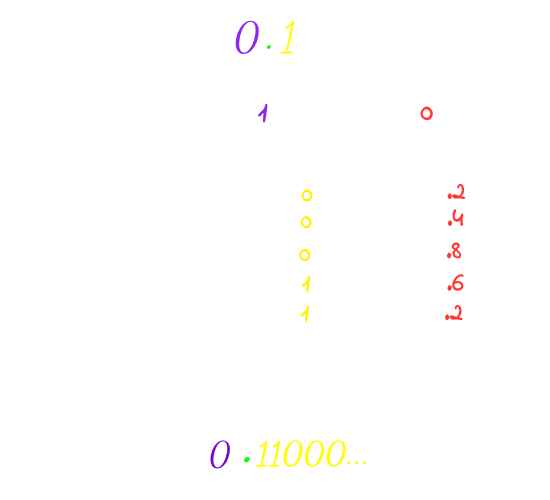
Number systems are just symbolic methods for representing quantities. When we want to represent some floating-point number in the base-10 system, we can easily do it: 3/2 is 1.5. However, representing the same number in base-2 won’t be anything magical, just converting the number into binary using any method as we used to do. I will use the multiplication-by-base method.
Each number system can represent only the fractions whose the prime factor of it’s denominator is the base only, Otherwise the fraction will end in a loop.
For example, in the base-10 system, the prime factors of 10 are 2 and 5, so we can represent those fractions cleanly: 1/2, 1/4, 1/5, 1/8, and 1/10; they all terminate. But 1/3 will loop because 3 has no prime factor of 2 or 5, so the result would be = 0.3…
In the base-2 system, the only prime factor is 2, so you can only cleanly express fractions whose denominator has only prime factor 2. For example: 5/2 will terminate.
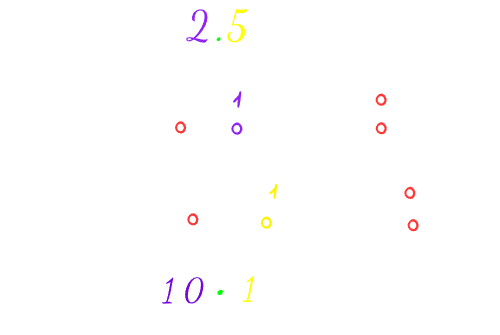
But 1/10 won’t because 2 is not the only prime factor for 10.
Section II. Storage
So, now, how to store (10.1)₂ in the computer? You may consider saving it like that [101,10], where (2)₁₀->(10)₂ is the location of the radix point. But this method is very inefficient due to the waste of memory in storing the location of the radix point, resulting in poor precision, for example, if you are willing to store this number in 8 bits, you may consider 4 bits for precision and 4 bits for the location of the radix point, this lower the precision of the number a lot because now you have only 4 bits instead of the whole 8 to sotre the precision.
Luckily, in 1985, IEEE came with a standard for representing the floating-point numbers called IEEE 754. They have made revisions on it in 2008 and 2019. Almost every computer you will touch uses it.
In this standard, floating-point numbers are stored in this bit layout

To understand how IEEE 754 solved the previous issues of other standards. Let’s try to store the previous numbers we have converted into binary using this standard.
Instead of storing (10.1)₂ in the previous unreliable way. Let’s tweak it a bit, and instead of storing the location of the radix point, we fix it’s position so it always has one digit to its left called the leading digit and it can be either 0 or 1 only to ensure normalization and since it’s pre-defined, we won’t have to store it. Then, we just store the exponent that tells us how many places we moved that point.
So much yapping! Let’s do some math operations in order to understand everything we have said here. Read this part again after seeing the illustration to understand better.
The leading digit in (10.1)₂ is (10)₂, but it should be 1 or 0 only; let’s actually try both, so:
= 10.1
= 10.1
Setting the leading bit as 0 or 1 is what specifies the type of normalization, where implicit normalization is moving the radix till the Most Significant 1, so the leading bit is always 1, while explicit is moving the radix after the Most Significant 1, so the leading will be 0.
So now we can almost store our number in that layout, except for one simple issue, since we are storing the exponent, it can be negative sometimes, if you thought of storing it in two’s complement, well! That’s a very good reasoning from you, but the issue with this solution is that the comparator won’t be able to deal with the two’s complement as a negative number.
That’s why in this standard, they use the excess binary code; it’s just adding bias for the numbers, so they all became positive, but still can represent negatives.
For example, an excess-3 would be like that: {-3, -2, -1, 0, 1, 2, 3}, add a bias of 3 for each number so they become {0,1,2,3,4,5,6} where 0 here represents -3
And with that, we are finally able to store our bits in that IEEE 754 layout by storing the exponent and the mantissa only!
Let’s just assume our bias now is 1, for example
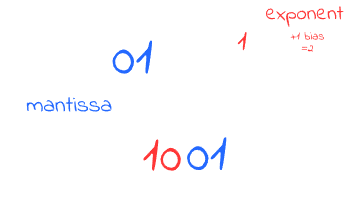
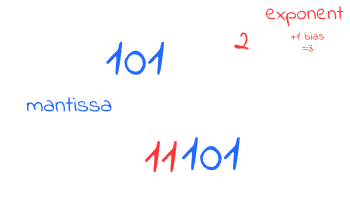
It is also clear that implicit normalization provides more accurate and higher precision than explicit normalization. By eliminating the necessity to store the leading bit of 1, we free up space to store a longer mantissa. For example, in our case, in the implicit normalization, we only needed bits to store the mantissa, whereas the explicit form would require 3 bits to store the same value.
Actually, you can try it by yourself, assume that you have size of 2 bits to store the mantissa only, store the numbers again, and see the difference in the accuracy by yourself.
Also we won’t always assume the size of the bits because this is what the formats of this standard is about. These formats essentially define the specific size for storing the number i.e. how many bits are allocated for the exponent, the mantissa, the sign bit, and what is the bias also, here’s a table of these formats

That’s why inside the computer, some values represented in the float, which is the implementation of binary32 format, aren’t equal to the values stored in double (binary64), so next time you see a behaviour like that (1/10)₂ + (1/5)₂ != (1/3)₂ You actually know why, because storing (1/10) and (1/5) results in repeating decimals, adding those two numbers means adding their repeating decimals too, which will result in an approximation, but not equal to, if you store the (1/3) natively with its own repeating decimals. But, for example, in terminating decimals, you won’t see this issue because repeating decimals here are ‘0’ and no matter how much you add to ‘0’s, it will be a consistent behaviour. That’s why also comparing non-terminating numbers stored in float to the same value in double results in a falsy value, because basically they aren’t the same. But comparing terminating numbers in this case will result in a truthy comparison, because terminating 0s are the same. For more on that, check this post.
Section III. Infinity and Not A Number
Additionally, for the sake of completeness, let me tell you another thing you should know about! Never wondered how your computers represent ? Well, in this standard, it uses the floating point system where it reserves the value where all of the Exponent bits are set to 1 and all of the Mantissa is set to 0. This is the actual storage of and by this, your computer can do some operations on it. Did you also know that NAN is represented by the reserved value where the Exponent bits are set to 1, but the Mantissa is anything but 0?
Didn’t know? Either me too before learning Computer Science, Seems like there is a lot of fun stuff to learn in CS, so don’t miss the chance and learn the fundamentals of CS XD